24 car trend AI video generator
The 24 Car Trend
A new car reveal generated from your photo: lift the 2 and the 4 over the lens, drop them, and cut to you with a car. Add the trend sound from TikTok or Instagram when you post.
1 photo of you18+ only10s · 16:9add the trend sound when you post
24 Car Trend AI · Track 01
Car reveal · 10 seconds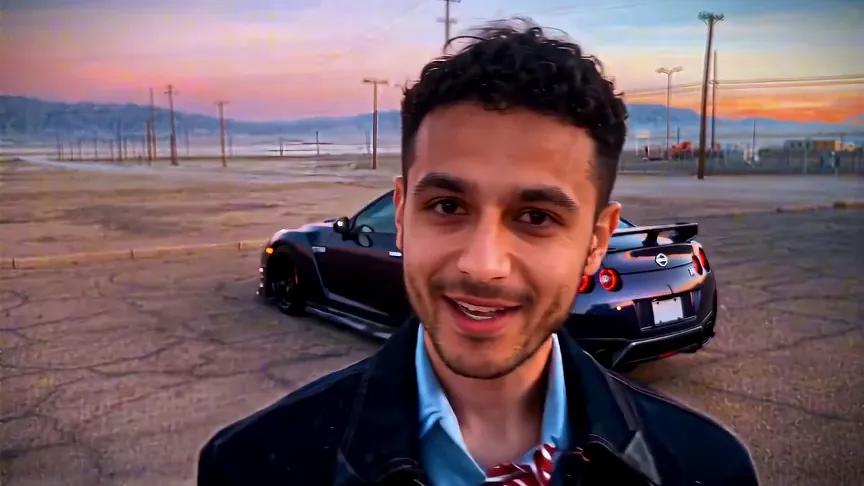
01 · Create your video
Generate your car-reveal clip
Upload one clear photo of yourself (18+). Sharp, evenly lit photos produce a more stable reveal.
Selected templateThe 24 Car Trend
01
Upload one clear photo of yourself (18+)JPG, PNG or WebP · max 8 MB
We generate a new 10-second clip from your photo. A selfie mainly guides the face; a half- or full-body photo also guides hair and build. The AI aims for a car reveal with a playing-card style transition, but the exact car, pose and movement are not guaranteed. If no face can be detected, the credits for that generation are returned.
After a successful video, we keep your processed photo with it for up to 7 days; deleting the video or your account removes both sooner. Failed jobs delete their photos. Your photos are sent through the yir.ai gateway to ByteDance’s Seedance 2.0 AI video model, which processes them only to render your video. Privacy policy
02
Export quality10 sec · 16:9 · new clip from your photo
Your balance—
This generation45 credits
Failed or blocked generations return all reserved credits.
02 · The clip
The 24 car trend template
The preview still is not your video. We generate a new clip from your photo. Add the trend sound from TikTok or Instagram when you post.
24 Car Trend AI workflow
How it works in 3 steps
Upload your photo
One clear photo of yourself (18+) is required: face and upper body, good light, no sunglasses. Public figures and any other real person are not allowed.
Add your car (optional)
Add a car photo if you want your own car in the reveal.
Generate and post
You get a new 10-second, 16:9 clip generated from your photo. When you post, add the trend sound from TikTok’s or Instagram’s music library.
24 car trend format
What the 24 car trend looks like
Two cards, one cut, one car. You hold up a card with a 2 and a card with a 4 in front of the camera, lower them, and the shot switches to you standing next to a car. That is the whole 24 car trend - it works because the cut hides the transition.
Read the complete 24 car trend guide24 car trend photo guide
What you need to upload
One clear photo of yourself (18+) is required: face and upper body, good light, no sunglasses. A photo of your car is optional and must not show people or readable plates. Leave it out and the reveal uses a generic car.
01A photo of yourself (18+): front-facing, half- or full-body02Only you in the photo, clearly visible03Car photo: front 45° or side view, one car, no people, no readable plate04Sharp, well-lit photos work best
24 car trend FAQ
24 car trend questions before you generate
01What is the 24 car trend?+
It is a 10-second car reveal: you hold a 2 and a 4 card over the camera, drop them, and the next frame shows you standing next to a car. The cards hide the cut, which is why the transition looks seamless.
02Can I make the 24 car trend with my own photo?+
Yes. Upload one photo of yourself (18+), add a photo of your car if you want it in the reveal, and we generate a new 10-second clip starring you. Public figures, celebrities and any other real person are not allowed.
03Do I need a car photo to make the video?+
No. Your own photo is the only required upload. If you skip the car photo, the reveal uses a generic car. If you add one, we keep the car’s shape and colour as close to your photo as the render allows.
04Does the video include the trend song?+
No. The download does not include the trend song. A royalty-free soundtrack is mixed in. When you post on TikTok or Instagram, add the trend sound from that platform’s music library.
05Whose photo can I upload?+
Only a photo of yourself, and you must be 18 or older. Public figures, celebrities and any other real person are not allowed, and there is no parody or fan-edit exception. The optional car photo must not show people or readable plates.
Variations of the same trend
People describe this same 10-second card-and-car reveal in a few ways. One generator covers that format. Brand names in the footer are there only to say we are not affiliated with them.
How do I create a video?
Open the generator, upload one photo of yourself (18+), add a car photo if you want one, pick a quality and generate. Clear source photos help, but no result is guaranteed. Go to the generator.
Add the trend sound when you post
The download does not include the trend song. A royalty-free soundtrack is mixed in. When you post on TikTok or Instagram, add the trend sound from that platform’s music library.
Resolution and credits
| Output | Credits |
|---|---|
| 480p | 20 |
| 720p | 45 |
| 1080p | 80 |
Credit packs and prices
| Pack | Credits | Price |
|---|---|---|
| Starter | 50 | $9.90 |
| Creator | 105 | $19.90 |
| Crew | 160 | $29.90 |
Your photo stays yours
Uploads are used to render your video and are not added to a public gallery. Only a photo of yourself (18+) is allowed.
Pricing · Refunds · Privacy · Copyright · About · Contact
Landscape 16:9, sized for the feed it performs in
Every render comes out at 16:9 in 10 seconds - the length and shape the trend is normally posted in, so you are not cropping a widescreen clip down to a phone frame and losing the car.
How long are files available?
Finished videos can be downloaded for 7 days. Source photos are deleted after a failed job and removed with the video. Failed or blocked generations return reserved credits. That return is credits, not cash. See the refund page for credit-pack refunds.
24 car trend AI generator